AI Redaction Software: What Cognitech Intelligence Actually Does & Why It Matters? 

AI Redaction Software: What Cognitech Intelligence Actually Does & Why It Matters? 

Surveillance footage is rarely clean. The cameras that capture the most useful evidence, parking lots, store entrances, and street corners, tend to be older, lower-resolution, and positioned just far enough away to make faces ambiguous.  

Add to that the privacy obligations investigators face before sharing footage with courts or legal teams, and what should be a straightforward evidentiary process turns into hours of manual work. That is the problem Cognitech Intelligence was built to solve. It is an AI-powered module that handles two things forensic analysts need most: automatic face detection and redaction for privacy compliance, and targeted face enhancement to pull usable detail out of low-quality recordings.  

No manual frame marking. No guesswork. The software identifies what is in the frame and applies the right processing to it automatically. Below is a practical look at how each feature works, who uses it, and why the deep learning foundation underneath it produces results that older approaches simply cannot match. 

The Problem with Manual Video Processing 

Before getting into what Cognitech Intelligence does, it helps to understand what it replaces. For years, investigators processing video evidence had two main options: apply a static filter across the whole frame (which blurs everything, including evidence you want to keep), or go frame by frame and manually mark the faces that need to be obscured. The first approach is blunt. The second is slow, genuinely slow, on anything longer than a few minutes of footage. 

Neither approach scales well. A busy precinct, a multi-camera investigation, an incident with hours of relevant footage manual redaction becomes a bottleneck. And because it depends on individual attention to every frame, it carries real risk of missed faces, inconsistent coverage, and human error that can later be challenged in court. AI redaction software addresses all of this by automating the detection layer. The software finds faces. You decide what happens to them. 


How Does Cognitech Intelligence Works? 

The platform runs on deep learning models trained to recognize human facial features across varying conditions, including different lighting, partial obstructions, varying distances, and angles. That training is what separates it from older rule-based filters, which could only detect faces that fit a fairly narrow set of parameters.  

Once a face is detected, you have control over what the software does with it. That is an important distinction. The system is not just a one-size-fits-all blur tool; it allows investigators to redact some faces while enhancing others in the same footage. In practice, that means you can protect the identity of a bystander in one part of the frame while improving the clarity of a person of interest in another. 

Here is a closer look at each of the core capabilities. 

  • Automatic Face Detection 

The detection filter scans video frames continuously, identifying human features without requiring any manual input. There is no clicking on faces to mark them, no drawing bounding boxes by hand. The model does that work, flagging each detected face, so the next stage of processing knows exactly where to act. 

This accuracy matters downstream. Redaction is only as reliable as the detection beneath it if the detection misses face or generates too many false positives; the output is not trustworthy. Cognitech Intelligence’s deep learning model is trained to minimize both. 

  • Face Redaction 

Once faces are detected, the redaction filter applies automatic obscuring. For privacy compliance work  releasing footage to media, sharing with opposing counsel, publishing incident reports this is where the time savings are most obvious. What previously required for an analyst to spend hours on a single clip can be processed in a fraction of the time, with consistent results across every frame. 

The controls are intentional, not afterthoughts. Analysts can determine which detected faces get redacted and which are preserved. In investigations where identifying a specific individual from footage is the goal, you would not want to obscure that face the software gives you the granularity to handle both situations in the same workflow. 

  • Face Enhancement 

This is the counterpart to redaction. Where redaction hides, enhancement reveals. The face enhancement filter applies specialized processing to the facial regions in a frame, working with existing pixel data to produce greater clarity and definition than the original recording contains. 

A common misconception about enhancement tools is that they fabricate detail  that they fill in what was never captured. That is not how Cognitech Intelligence’s approach works. The algorithms work with what is actually in the recording. The result was not invented; it is clarified. For identification purposes, that distinction matters both evidentially and legally. 

  • Video Upscaling 

Separate from face-specific processing, the upscaling filter improves overall frame resolution across a recording. Low-resolution surveillance footage still common in older installations can be processed to reveal environmental detail, plate numbers, clothing, and other identifying context that is lost in the original quality. 

For forensic analysis, security reviews, and archival work, this broader enhancement capability often makes the difference between footage that is evidentially useful and footage that isn’t. 

  • Upscaling Combined with Face Enhancement 

The most comprehensive option runs both filters together. Overall resolution is boosted across the full frame, and specialized facial enhancement is applied simultaneously to every detected face within it. The result is footage that is clearer in context and clearer on individuals the best-case output for investigative use. 

This combined mode integrates with the wider Cognitech desktop suite as well. If your team uses  VideoActive 64 for video forensic analysis including real-time capture, processing, and forensic encoding Cognitech Intelligence works alongside it as part of the same evidence processing pipeline. 

AI Redaction software

Who This Is Built For? 

Cognitech Intelligence is not a general-purpose tool. Access is restricted to government agencies, qualified organizations, and designated specialists a deliberate policy that reflects the sensitivity of what it is used for. 

In practice, that means: 

  • Law enforcement investigators working body cam, CCTV, and surveillance footage 
  • Legal teams preparing video evidence for court proceedings 
  • Security and intelligence analysts reviewing footage for threat identification 
  • Archival professionals working with historical or degraded recordings 

The platform carries approvals from CISA and EOUSA, and has been used by agencies that operate under strict evidentiary and chain-of-custody requirements. That is not marketing language, it reflects decades of Cognitech’s presence in the forensic technology space and the standards the software is held to. 

For agencies that need cloud-based forensic workflows in addition to desktop processing, Cognitech’s  digital forensics platform on MC2 Cloud handles investigation at scale, with the same underlying precision. And for a full overview of the desktop software ecosystem, the  forensic video analysis software at Cognitech covers the complete product range. 


Why Deep Learning Produces Better Results Than Older Methods? 

Earlier video enhancement tools worked with fixed algorithms. They could adjust contrast, apply sharpening filters, reduce noise useful operations, but ones that had no understanding of what was in the frame. They treated every pixel the same way. 

Deep learning changes fundamentally. A model trained on large datasets of faces learns what facial structure looks like the geometry, the typical proportions, the way features relate to each other. That understanding is what allows enhancement to be applied specifically and accurately to faces, rather than generally to everything. 

For forensic work, where the accuracy of every output can be scrutinized under cross-examination, that reliability is not a nice-to-have. It is the whole point. 

Conclusion: 

The work of identifying someone from a blurry frame, or preparing hours of footage for a compliance review, used to demand a lot of analyst time on tasks that were essentially mechanical. Cognitech Intelligence handles that mechanical layer automatically, consistently, and with the precision that evidentiary work requires. 

If your organization works with video evidence and needs a better way to manage redaction and enhancement, the next step is requesting a quote. The platform is available to qualified agencies and organizations through Cognitech directly. 

Talk with experts for Forensic video Processing Software and Forensic Image Processing Software solutions. Contact Cognitech! We hope you enjoyed this Blog! Stay tuned, and don’t miss the coming blogs. You can follow us on Twitter, Facebook, Instagram, Linkedin, or Youtube: we post Community Blogs regularly so you won’t miss any


Frequently Asked Questions 

What does AI redaction software actually do with video footage? 

It automatically detects faces across video frames using deep learning and applies obscuring to them without needing an analyst to manually mark each face. You control which faces are redacted and which are preserved, so the tool works for both privacy compliance and investigative use in the same clip. 

Is face enhancement the same as fabricating detail that was not in the original footage? 

No. Cognitech Intelligence’s face enhancement works with the pixel data that is actually in the recording. It applies processing specific to facial geometry to clarify and sharpen what is already there  it does not generate or invent features. That distinction matters both for accuracy and for how the output holds under legal scrutiny. 

Can I redact some faces and enhance others in the same video? 

Yes. The platform gives you control over individual detected faces, so you can obscure bystander identities for privacy compliance while preserving and enhancing  the faces of individuals relevant to the investigation. Both operations can run on the same footage. 

How does Cognitech Intelligence fit into a broader forensic video workflow? 

It works alongside Cognitech’s full product ecosystem  including VideoActive 64 for real-time capture and encoding, and the MC2 Cloud platform for cloud-based forensic investigation. Cognitech Intelligence handles the AI-powered processing layer within that broader pipeline. 

Does the upscaling work on any type of surveillance footage? 

The upscaling filter is designed for the kinds of low-resolution footage commonly encountered in forensic contexts older CCTV systems, compressed recordings, archival material. For specific format compatibility and system requirements, contact Cognitech directly.

Enhancement software

Image Noise in Forensic Investigations: Challenges & Solutions

Image Noise in Forensic Investigations: Challenges & Solutions

Image noise is a common challenge in forensic investigations. It can obscure important details in evidence, making it harder to analyze and extract crucial information. Image Enhancement software plays a critical role in removing noise while preserving clarity, helping forensic experts uncover the truth hidden in images and videos

What is Image Noise?

Image noise refers to unwanted random variations in brightness or color that degrade image quality. It often appears as grain, static, or distortions. Noise can come from several sources, including low-light conditions, sensor interference, or video compression.For forensic investigations, noise can be a major obstacle.

Poor-quality images may hide key details like faces, license plates, or objects. Without the right tools, investigators may struggle to extract usable evidence. 

Sources of Image Noise

Forensic images and videos often suffer from different types of noise, including: 

  • Sensor Noise: Caused by camera limitations, especially in low light. 
  • Poor Weather Conditions: Fog, rain, or dust can introduce noise and distort visuals. 
  • Compression Artifacts: Video compression can create unwanted blocky patterns. 
  • Pattern Noise: Unwanted textures from surfaces can obscure forensic details. 

These issues make forensic software essential in restoring image quality and making evidence clearer. 

How Image Enhancement Software Removes Noise

Modern image enhancement software includes advanced filters that reduce noise while preserving important details. These tools allow forensic experts to clean up footage without altering the integrity of the evidence. 

1. Denoise Filters 

Denoise filters remove noise while maintaining fine features. They help enhance evidence videos affected by sensor noise, low light, or environmental interference. Advanced denoise algorithms ensure the image remains sharp and clear. 

2. Deblocking Filter 

Compression artifacts, like blocking and ringing, occur when a video is heavily compressed. This is common in security footage or online videos. The deblocking filter removes these artifacts, improving image clarity while keeping important details intact. 

3. Pattern Removal Filter 

Forensic images sometimes contain pattern noise, especially when analyzing latent prints on textured surfaces. The pattern removal filter eliminates these distractions, making it easier to analyze fingerprints and other forensic evidence. 

Why Noise Removal is Critical in Forensic Investigations

Forensic experts rely on image enhancement software to: 

  • Reveal hidden details in crime scene images. 
  • Improve the clarity of security footage. 
  • Enhance facial recognition and object identification. 
  • Restore old or degraded images for investigation. 

Without noise reduction, critical evidence may be lost or misinterpreted. Advanced forensic software ensures that every detail is preserved while removing unwanted distortions. 

Enhancement software

Conclusion

Image noise is a major challenge in forensic investigations. It can obscure key evidence, making analysis difficult. Fortunately, image enhancement software provides powerful tools like denoise, deblocking, and pattern removal filters to restore clarity without compromising evidence integrity. 

By using the right forensic software, investigators can enhance images and videos effectively, helping to uncover the truth and support legal cases. As technology advances, noise removal methods continue to improve, making forensic analysis more reliable than ever. 

Talk with experts for Forensic video Processing Software and Forensic Image Processing Software solutions. Contact Cognitech! We hope you enjoyed this Blog! Stay tuned, and don’t miss the coming blogs. You can follow us on Twitter, Facebook, Instagram, Linkedln, or Youtube: we post Community Blogs regularly so you won’t miss any! 

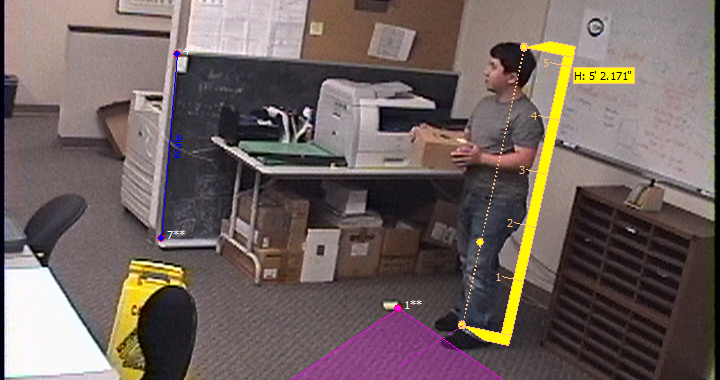
Cognitech AutoMeasure Photogrammetry Measurement Result Example

The Role of Photogrammetry in Criminal Investigations: Measuring the Invisible

The Role of Photogrammetry in Criminal Investigations: Measuring the Invisible

Photogrammetry is a smart tool in modern crime solving. It helps experts study crime scenes by using images or video. With today’s advances in technology, tools like Cognitech AutoMeasure stand out. This software is known as the best photogrammetry software for forensic work. It is part of the new age of video investigation software and forensic video software that makes solving crimes easier. 

What Is Photogrammetry?

Photogrammetry is a method that uses photos and videos to measure distances and sizes. It works by taking images and turning them into measurements. This method helps experts to capture the details of a crime scene. It turns two-dimensional images into three-dimensional data. The method is very useful when there is no physical access to the scene. 

How It Helps in Investigations

Using photogrammetry, investigators can measure many details. For example, it can record the height of a person or the width of a vehicle. Many types of dimensions are captured by this tool. The software does more than just measure height. It can measure shoulder width, scene lengths, angles, and even areas. This data is very important. It helps experts to recreate the crime scene in detail. They can see how the crime unfolded. 

Cognitech AutoMeasure Photogrammetry Measurement Result Example

The use of video investigation software and forensic video software is key here. These tools work together to give a full picture of the scene. They help experts gather solid evidence. The evidence is then used in court to solve cases and bring truth to light. 

Benefits of Cognitech AutoMeasure

Cognitech AutoMeasure is a leading tool in the field. It offers many benefits over older methods. First, it measures more than just one dimension. It can capture multiple data points in one go. This makes it more accurate and efficient. Second, it works well with both images and videos. This means that investigators do not need special cameras or tools. They can use the images they already have. 

The software is easy to use. Its design is clear and simple. Even those new to digital investigations can learn it quickly. The tool is also very precise. It gives accurate measurements. This helps reduce any errors during an investigation. 

Applications in Crime Scenes

The use of photogrammetry is not just about numbers. It has many real-world applications. For instance, experts can use the measurements to study accidents. They can analyze the scene and decide how an accident happened. In criminal cases, the tool helps to measure important details. The dimensions of a crime scene are captured clearly. This includes the size of a vehicle or the space where a crime took place. 

The power of forensic video software is clear. It makes the invisible visible. With accurate measurements, investigators get a better idea of the scene. They can reconstruct events with precision. This is a step forward in modern forensic science. It also helps courtrooms to see the truth behind the evidence. 

FAQs

Q1: What makes Cognitech AutoMeasure different from other software? 
A1: Cognitech AutoMeasure stands out because it can measure many different dimensions. It does more than just measure height. It captures vehicle dimensions, biometric sizes, and scene details. 

Q2: How does photogrammetry help in criminal investigations? 
A2: Photogrammetry turns photos and videos into data. This data helps experts recreate a crime scene. It makes it easier to understand the event and find clues. 

Photogrammetry is a game changer in criminal investigations. It brings the invisible into clear view. With tools like Cognitech AutoMeasure, forensic video software and video investigation software lead the way in modern crime solving. 

Talk with experts for Forensic video Processing Software and Forensic Image Processing Software solutions. Contact Cognitech! We hope you enjoyed this Blog! Stay tuned, and don’t miss the coming blogs. You can follow us on Twitter, Facebook, Instagram, Linkedln, or Youtube: we post Community Blogs regularly so you won’t miss any! 

forensic multimedia examination tools

How Cognitech Video Investigator® 64 Helps Solve Criminal Cases

How Cognitech Video Investigator® 64 Helps Solve Criminal Cases

Digital Evidence Analysis is vital in modern investigations. It helps experts find clues in videos. Video analysis software improves evidence quality. Crime Scene Video Analysis is one part of this work. In busy crime scenes, every detail matters. Clear videos can make or break a case. This article explains how modern tools help solve crimes. 

Improving Video Quality

Old videos are often blurry or dark. Video analysis software fixes these issues. It removes noise and sharpens images. This makes details more visible. Faces, objects, and even license plates become clearer. Enhanced videos provide strong evidence. Digital Evidence Analysis turns poor recordings into clear proof. Crime Scene Video Analysis is more effective when the video is improved. Short, clear clips help experts see each detail. 

Combining Different Video Sources

Many crime scenes use cameras from different places. The software works with many file types. It is helpful because videos come from different devices. Investigators can join videos into one timeline. A clear timeline shows when events happened. Matching times makes a case stronger. The software also makes it simple to compare footage. 

Video Forensics

Geographical Video Analysis

Some video analysis software uses GPS data. This is known as Geographical Video Analysis. It links video evidence to specific locations. When cameras record a scene, they also note the location. This helps track where a suspect might have been. It is now easier to join videos from different places. Simple maps and timelines gently guide the investigation. Digital Evidence Analysis now includes location details, so Crime Scene Video Analysis can show the whole story. 

Enhancing and Correcting Images

Image enhancement is a core feature. The software adjusts brightness and contrast. This brings out hidden details. It fixes blurs and other faults. Filters reduce errors from shaky cameras. Every small detail is important. Improved images help experts spot clues that matter. Digital Evidence Analysis gets stronger with each correction. Crime Scene Video Analysis becomes more reliable as images improve. 

Protecting Sensitive Information

Video redaction is another useful tool. The tool gently hides faces and other private details. It helps keep innocent people safe by softly blurring sensitive information. This step is very important when sharing evidence. The focus stays on the main clues. Digital Evidence Analysis makes sure the data stays clear and secure. At the same time, Crime Scene Video Analysis respects privacy while showing the key facts. 

Easy-to-Use Tools for Investigation

The software offers simple tools for experts. Videos can be split into short clips. This makes detailed study easier. Investigators can review each clip on its own. Side-by-side comparisons reveal differences. Each tool is made for fast work. Digital Evidence Analysis becomes more efficient with these aids. Crime Scene Video Analysis is simple and clear with easy controls. 

Conclusion

Modern video analysis software is a must in today’s investigations. Digital Evidence Analysis reveals hidden clues in every frame. Crime Scene Video Analysis gets stronger when every detail is clear. With improved video quality, accurate timelines, and location data, solving crimes is faster. Protecting sensitive information adds trust to the process. Each feature works to give clear, reliable evidence. This tool is essential for law enforcement. Clear videos lead to stronger cases and safer communities. With every detail in focus, justice is more likely to prevail. 

Talk with experts for Forensic video Processing Software and Forensic Image Processing Software solutions. Contact Cognitech! We hope you enjoyed this Blog! Stay tuned, and don’t miss the coming blogs. You can follow us on Twitter, Facebook, Instagram, Linkedln, or Youtube: we post Community Blogs regularly so you won’t miss any! 

video forensics

Forensic Video Analysis Software: Uncovering Digital Evidence Now

Forensic Video Analysis Software: Uncovering Digital Evidence Now

Forensic Video Analysis Software is a powerful tool for modern investigations. It helps police and experts study video files and images. This software makes it easier to find clues in recordings. One example is Cognitech’s Video Investigator® 64. This tool is part of the Tri-Suite64 package. It is used to enhance CCTV footage and many other video files. 

What is Forensic Video Analysis Software?

Forensic Video Analysis Software is designed to improve video quality. It can fix blurry or dark videos. The tool removes noise and sharpens images. This makes hidden details clear. With better images, investigators can solve cases more quickly. This software works with many video and image types. 

Key Features of Video Investigator® 64

Cognitech Video Investigator® 64 has many strong features. First, it has an interactive interface. The software lets users adjust each frame with ease. Changes show in real time, so results are immediate. Next, it offers powerful filters. These include deblurring, denoising, and reconstruction. These filters help to restore lost details. The tool also authenticates images to make sure they are true. Each feature is built to support forensic work. 

video forensics

Interactive Interface

The interactive interface is simple and clear. Users see a live video preview as they work. They can change settings on the fly. The software lets users adjust parts of a frame quickly. This helps them get the best view of important details. The clear interface makes the software user-friendly. Even new users can learn it fast. 

Advanced Tools for Investigations

The software comes with smart tools that aid in investigations. A smart selection tool lets users pick key parts of a video. Glyph drawing tools help mark faces or objects. Tracking tools follow moving items from frame to frame. There is also geolocation analysis to link videos with places. All these tools help experts find hidden clues. They also make the job of analyzing evidence much faster. 

Enhanced Image and Video Quality

Video Investigator® 64 boosts image and video quality with its filters. It uses deblurring filters to fix shaky footage. Denoising filters remove random noise from images. Reconstruction filters bring back details that are lost in poor recordings. These improvements make a video strong enough to use in court. When the evidence is clear, the investigation is stronger. 

File Format Support and Ease of Use

This Forensic Video Analysis Software supports many file formats. It works with popular video types and standard image files. This makes it easy to use in many cases. Investigators do not have to change files before they start working. The tool is built to handle a wide range of video sources. This wide support saves time and reduces work. 

FAQs 

  1. What makes Forensic Video Analysis Software different from regular video tools? 
    It is built for evidence and accuracy. It improves video quality to reveal hidden details. Regular editors focus on creative effects, not on forensic accuracy. 
  2. How does Cognitech Video Investigator® 64 help solve criminal cases? 
    It sharpens images and clears up blurry videos. This helps experts see faces and objects clearly. The tool supports many file types and provides clear, reliable results. 

Conclusion

Cognitech Video Investigator® 64 is a top choice for forensic experts. This Forensic Video Analysis Software makes videos clear and finds hidden clues. Its interactive interface and strong filters set it apart. The many smart tools help users work fast and well. With support for many file formats, it fits many needs. This tool makes tough investigations easier. With simple controls and clear results, it is a must-have for modern forensic work. 

Talk with experts for Forensic video Processing Software and Forensic Image Processing Software solutions. Contact Cognitech! We hope you enjoyed this Blog! Stay tuned, and don’t miss the coming blogs. You can follow us on Twitter, Facebook, Instagram, Linkedln, or Youtube: we post Community Blogs regularly so you won’t miss any!